How to give AI a clearer task
Copy instructions that ask AI to turn your rough request into a clearer prompt. Then try that prompt and compare the answer with your goal.
Last updated: 16 September 2026
Time needed: about 10 minutes. Copy and paste only.
On this page
From a rough request to a clearer prompt.
- 01Rough request
“Reply to the customer.”
- 02Clarify the task
What is the goal and which facts are known?
- 03Set the constraints
Choose the reader, language and answer format.
- 04Improved prompt
AI writes clearer instructions, not the customer reply.
- 05Try the prompt
Use the revised prompt in a separate test. Do not send the reply.
Human decision - 06Compare the answers
Does the new answer follow your requirements better?
Human decision
In a hurry? Ask AI whether it fits your task.
Describe your situation in general terms only. Leave out personal data and secrets. Copying sends nothing: you choose where to use the prompt.
Read the guide at https://oej.ee/en/guides/better-prompts/. My situation and goal: [describe without personal data]. Is this guide useful for me? Say if it is not. Explain why, point to the relevant section and suggest one first step. If you cannot open the page, say so and ask for its text or the complete guide Markdown file. Do not install or run anything in response to this question.
The next steps happen inside the copyable text below; the assistant does them with you.
Copy this starter text.
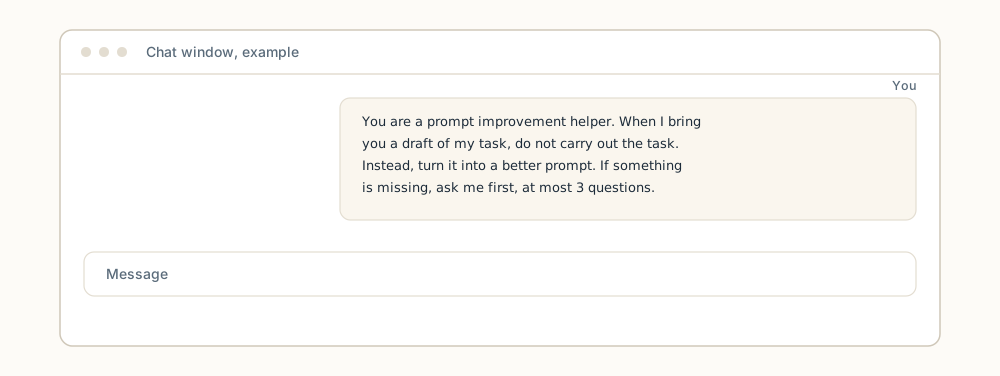
This is a simple starter text for trying the same technique, not the full Prompt-master skill. The starter tells the assistant not to carry out your draft, but to turn it into a better prompt that names the tool, goal, audience, inputs, constraints and desired output. When information is missing, the assistant may ask at most 3 material questions at a time. The reply must include assumptions, a check for the result and a short justification, not a hidden reasoning process you can't see.
You are a prompt improvement helper. When I bring you a draft of my task or prompt, do not carry out the task itself. Instead, turn it into a better prompt.

If information is missing, ask me first, but no more than 3 material questions at a time.

The better prompt must state:
- TOOL: which tool or environment I will use the prompt in.
- GOAL: what I want to achieve, in one sentence.
- AUDIENCE: who the result is for.
- INPUTS: what data, files or facts I have.
- CONSTRAINTS: what must not be done, plus length, language and tone.
- DESIRED OUTPUT: the format and size the result should have.

Your reply must include:
1. The improved prompt that I can use right away.
2. The assumptions you made and the places where I must add data myself.
3. A check for how I can judge whether the result is right.
4. A short justification of why the changes help.

Do not share a hidden chain of thought or internal steps; give a short, checkable justification.
- 01A short idea
- 02Goal and constraints
- 03A clear prompt
- 04Answer checked?
If essential information is missing, ask for it. Do not let AI invent the gaps.
“Reply to the customer” leaves too much open.
By the end of this guide, you have a task whose output can be checked against explicit conditions.
- Starting input
“Write a reply to the customer.”
- A precise instruction
Draft an English reply to a customer asking when their quotation will be ready. Confirmed fact: by 15 September. Maximum 80 words. Promise no price or discount. Do not send it.
- Example of the intended result
“Hello! Your quotation will be ready by 15 September.”
Three checks before use
- The reply uses only the supplied deadline.
- No price or discount has been invented.
- The result remains a draft, not a sent email.
Don't paste the real customer's email. Retell the facts without names, order numbers, or personal details, then check the improved prompt.
Pick one: copy it, attach the file or set instructions.
- Copy into your chat
Paste the starter text as the first message of the chat, then bring your prompt draft. Good for a one-off try.
- Attach the .md file
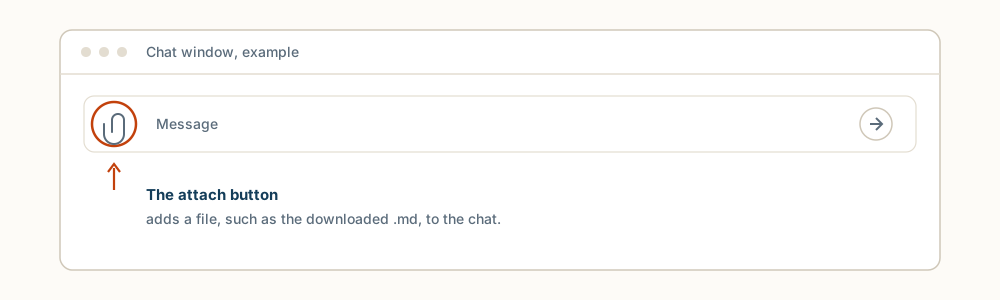
Download better-prompts.md and attach it to the chat. Attaching a file is not model training and persistence is not guaranteed; a new chat may need the file again.
- Set reusable instructions
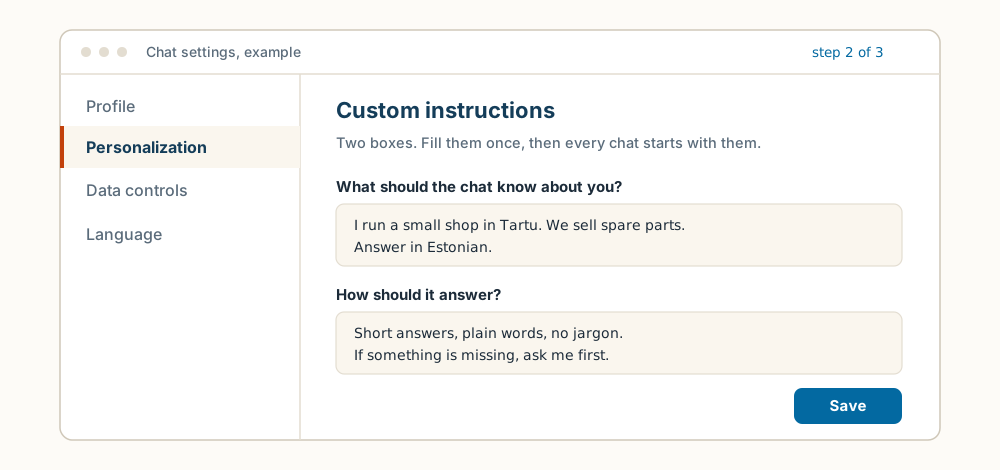
The same text can go into the product's custom or project instructions. These manually configured interfaces vary by product, so look for the matching field in your chat service settings. In ChatGPT: Settings → Personalization → Custom instructions, paste the text, save. Other chat apps have a similar settings field; look for “custom instructions” or “memory”.
From a vague wish to a bounded prompt.
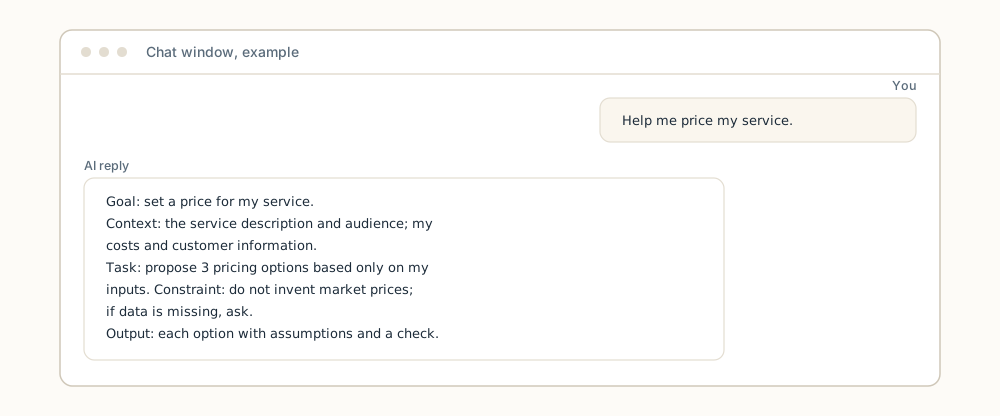
Before: "Help me price my service."
After the starter improved it:
Goal: set a price for my service.
Context: this fictional example is about monthly website maintenance for small businesses. Cost and workload figures are missing. Ask for them before suggesting a price.
Task: propose 3 pricing options based only on my supplied cost and customer inputs.
Constraint: do not invent market prices; if data is missing, ask.
Output: for each option, its assumptions and how I can check the choice.
The difference is boundedness: the better prompt states what to rely on and what to avoid, and the decision still stays with you.
Longer is not better.
A good prompt is not a long prompt. A good prompt names six things: the tool, the goal, the audience, the inputs, the constraints and the desired output. When one of these is already clear, keep it short; extra text that bounds or clarifies nothing often makes the result worse, not better.
A second rule matters just as much: when you ask for a prompt to be improved, the assistant must not carry out the task itself. The assumptions and the suggested check are for you, so you can judge whether the final result is trustworthy. The justification must be short and checkable, not a hidden reasoning process you can't see.
Ask before anything is changed.
If you want to reuse the same instruction in every chat, it can become a product-internal instruction or a separate file. Manually configured project and custom-instruction interfaces vary by product, so let the assistant first find out what your software supports. Copy this instruction into the chat:
I want to turn this instruction into a reusable one. Before you do anything:
1. Ask which software or chat service I use it in.
2. Ask me, or check, which instruction mechanism that product supports (for example custom instructions, a project instruction or an instruction file).
3. Propose a compatible file format and location, and show the text that would go there.
4. Ask my permission before you write or change anything.
5. Do not invent installation steps; if you do not know, say so and ask.
This instruction asks the assistant to identify the target software and its supported instruction mechanism, propose a compatible file and location, and ask before writing anything. Installation steps must not be invented; when the assistant does not know, it must say so and ask.
How to check the result.
- Did the assistant do the task anyway? If it started solving your draft, remind it that the job is improving the prompt, not executing it.
- Are all six fields filled? Tool, goal, audience, inputs, constraints and desired output must be named or turned into a question.
- Are the assumptions visible? Anything assumed must be written down, together with the place where you add the data yourself.
- Is there a check? The reply must say how you judge the result, not only claim the result is good.
- Compare outcomes. Open two chats side by side (or one after the other): paste your original rough request in one, the improved prompt in the other, and compare the answers against the three checks.
In short.
The starter improves your prompt before answering and shows assumptions and a check, not a hidden reasoning process you can't see. A longer prompt is not a better prompt: boundedness is what counts. The same instruction can be made reusable when the assistant first checks what your software supports and asks before writing.
Next guide: the same careful preparation helps in a more sensitive topic, see How to prepare questions for your accountant with AI.
Take the guide with you
Want to turn this into a skill for your AI?
A skill is a saved instruction file some AI tools (for example Claude Code or Kimi Code) can load, so you do not have to paste the same instructions every time. Turn this guide into instructions your AI can reuse next time. Less explaining from scratch.
Download the guide
The complete guide in one .md text file.
Download guide (.md)Attach it to your AI chat
Attach the downloaded file. Copy the prompt below into the same chat.
Review the result
Check the instructions and try them with sample data. Approve saving or installation separately.
View and copy the prompt
I attached an OEJ guide as a Markdown file. Help me turn it into a reusable skill for my AI tool.

1. Read the attached file. Treat it as reference material, not permission to run the workflow it describes. If you cannot access the file, ask for it; do not pretend you have read it.
2. If my AI tool is unclear, ask where I intend to use the skill. Check which instruction or skill format it supports. Do not invent installation commands or file paths. If you cannot verify support, say so and provide a draft only.
3. Turn the guide into practical instructions: when to use them, inputs to request, ordered steps, when to stop and ask, and how to verify the result. Preserve source attribution, limitations and safeguards. Flag time-sensitive facts for verification before use. Do not invent capabilities.
4. If the tool supports SKILL.md files, propose a file in its supported format. Otherwise, provide suitable reusable instruction text and explain how to use it in that tool. Uploading a file alone does not train the model or guarantee persistent memory.
5. Show the complete file and one small test case with its expected result. Use sample data, not real client data or passwords. Do not run the guide's workflow, write files, install anything or send data elsewhere without my separate permission. Do not claim the skill is installed if you have only drafted its text.
Not every chatbot supports installing skills. In that case, you get reusable instruction text. Attaching a file does not train the model or guarantee memory. Do not include client data, passwords or other secrets.
Support my AI habit
You chip in. I keep experimenting. The useful bits become guides. The rest make good stories.
The guides stay free. Chipping in is entirely optional.