OEJ PII Guard
Small tools for a specific job. First up: fewer personal identifiers in the text you share with AI.
What PII Guard does
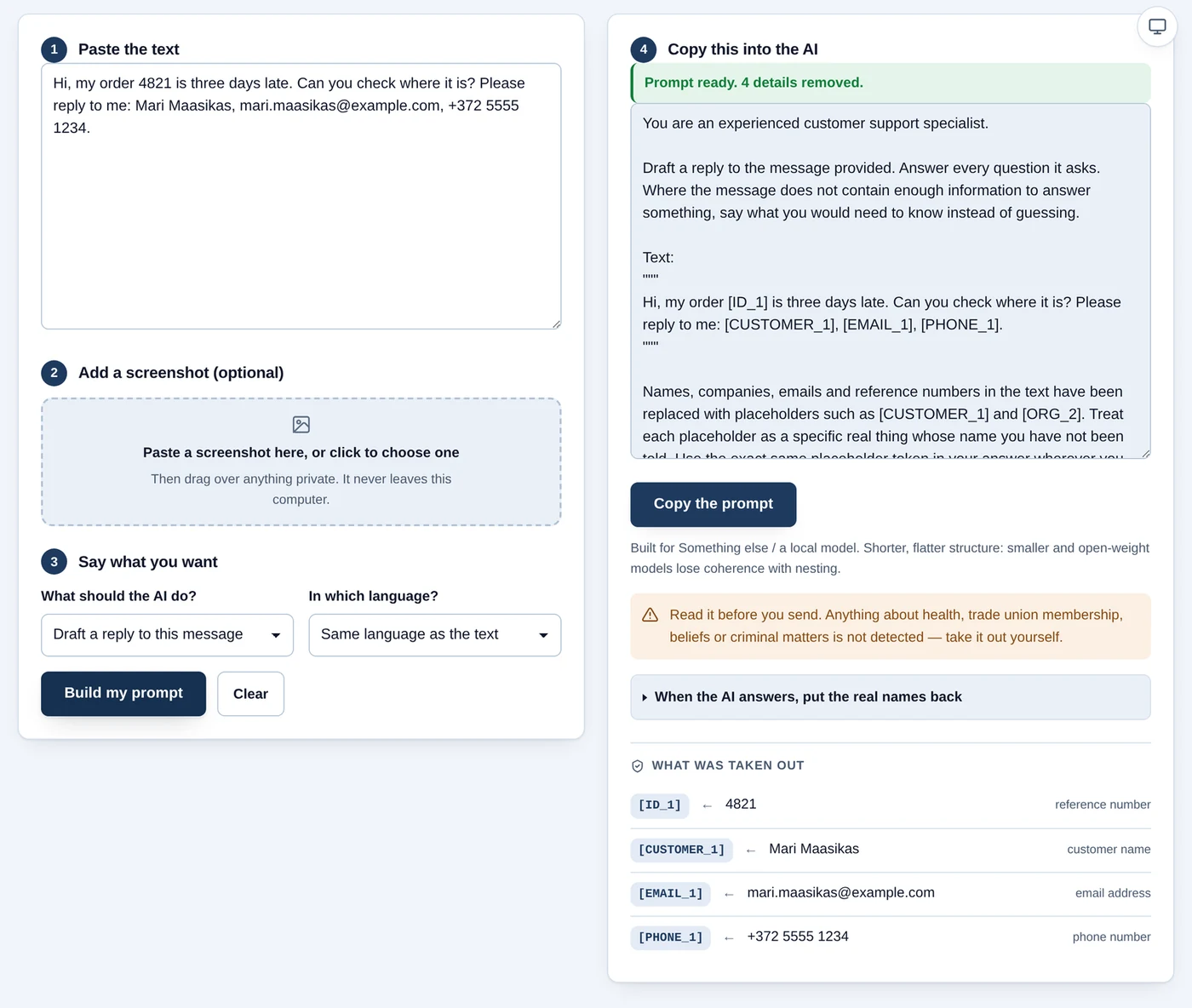
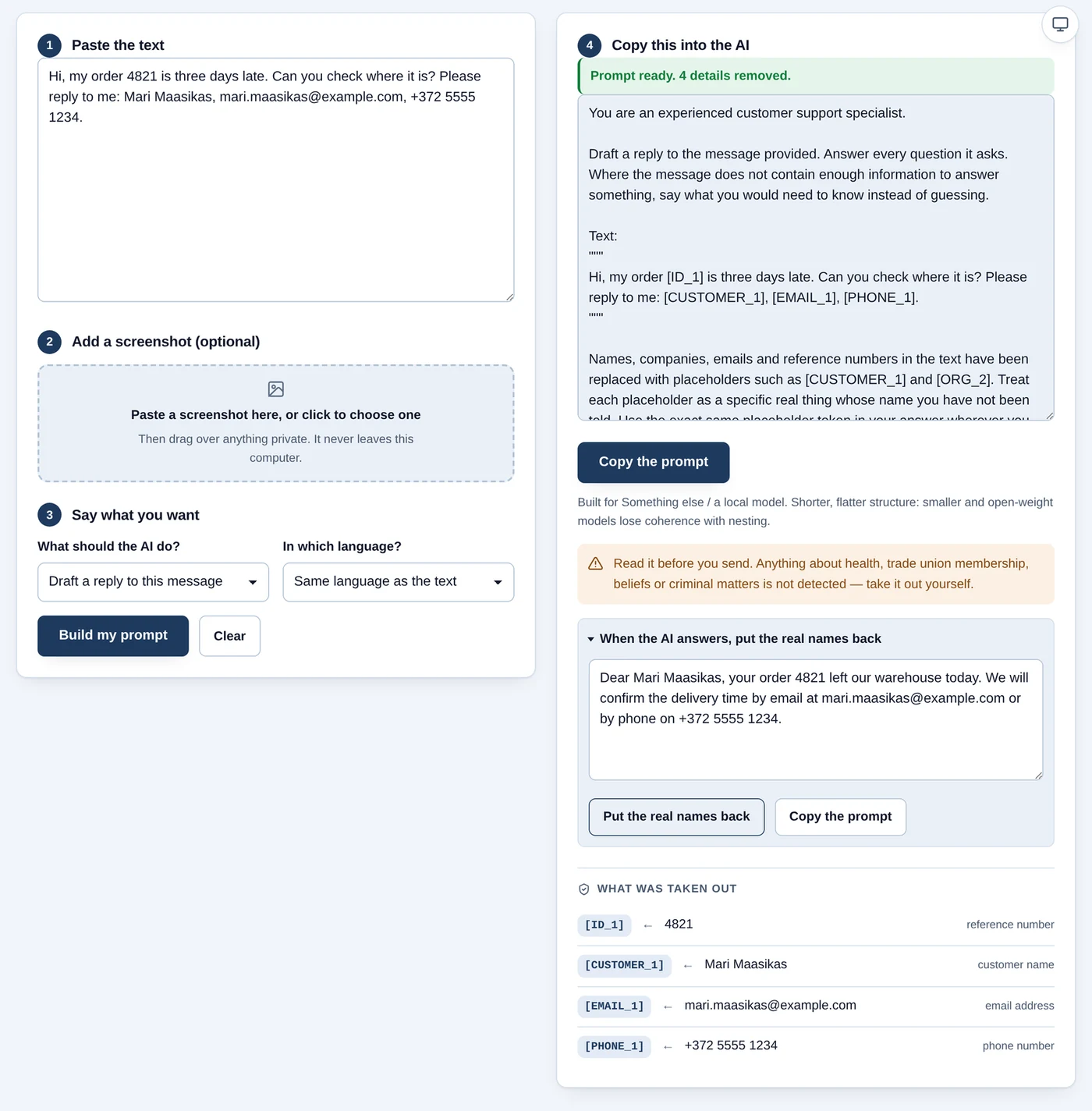
You need to understand a customer email. You do not always need the customer’s phone number to do that. PII Guard replaces the personal details it detects, such as names, email addresses, phone numbers and personal ID numbers, with temporary labels. It can put those details back into the reply later.
person@example.com  →  [EMAIL_1]
+372 5123 4567      →  [PHONE_1]
Try an example in the browser demo below: the “Load invented example” button fills in sample text for you.
BROWSER DEMO · NO INSTALLATION
Try it now. Text stays in your browser.
This simpler filter looks for emails, phone numbers starting with +, IBAN-shaped account numbers and 11-digit numbers that may be Estonian personal ID numbers. Add names, addresses and sensitive descriptions to the “Also hide” box. This is not the full downloadable Python tool.
Review the entire result. Patterns can miss identifiers or hide unrelated text. Filtering does not guarantee anonymity. Avoid shared computers and untrusted browser extensions.
3. Restore the original details in an AI reply
Before sharing, review the whole text and the AI service’s data-use terms. If you decide to share it, copy the filtered text into your AI chat. Paste the reply back here if you want to restore the original details.
You can restore the original details only while this page stays open and the original text is unchanged. If you edit the original text or the “Also hide” box, run the filter again. Do not send the restored reply to AI: it contains the original values.
Processing runs in this browser. The app does not send entered text to a server or save it. Loading the page is a normal web request. Copied text remains on your clipboard after clearing.
OEJ PII Guard
Try the browser demo first. There is nothing to install. If you need more settings, you can install the tool on your own computer.
Download source (.zip)Open setup guideFree · Tested on Linux · Windows or macOS: try the browser demo first
You decide before sharing with AI
- 01Add an invented message
Begin with synthetic text, not real customer data.
- 02Filter locally
A detected email becomes [EMAIL_1]. Some clues will be missed.
- 03Review it yourself
Check the text, custom instructions and manually masked image.
Human decision - 04Choose what to share
Only your deliberate paste takes text into an external AI service.
Human decision - 05Restore names in the reply
Paste the reply back. The replacement key stays in the local window.
- 06Read the reply
Edit and send it yourself. Restored text contains original data.
Human decision
What remains your responsibility?
- Remove health information and other sensitive details yourself.
- Cover private regions in screenshots manually and inspect the exported image. There is no OCR.
- Do not send the replacement map or restored reply to AI: they contain the original values.
- Check your external AI provider’s terms and processing location. A local filter does not make that service local.
What did I check in this version?
With AI assistance, I installed the extracted ZIP in a clean Linux environment, ran automated tests and exercised browser redaction, restoration, input changes and masked-image export. Custom instructions pass through the same filter, and the assembled prompt is checked again.
Detection is pattern-based. In a deliberately awkward probe set it catches 37 of 53 cases and misses 16. That is not a general accuracy rate. The final check uses similar detection rules, so it can miss the same details.
Download and attribution
Requires Python 3.10 or newer and a browser. The ZIP includes source, tests and Estonian/English instructions for AI-assisted or manual setup. This is a release candidate, not a one-click installer.
Based on piiguard-simple 1.1.0. The original copyright notice is retained; OEJ modifications use the same MIT licence.
Version 1.2.0rc1, MIT licence.
Download sourceSHA-256 checksumRead the project story